h2load is a benchmarking tool for HTTP/2 and HTTP/1.1. It is a popular choice for performance testing Laravel applications because it is lightweight, easy to use, and can be used to simulate real-world user traffic.
Documentation: https://nghttp2.org/documentation/h2load-howto.html
Pros:
– Lightweight: h2load is a lightweight tool that can be easily installed and used.
– Easy to use: h2load has a simple command-line interface that makes it easy to use.
– Real-world traffic: h2load can be used to simulate real-world user traffic by issuing requests at the same time from multiple threads.
– HTTP/2 support: h2load supports HTTP/2, which can improve performance for Laravel applications that use HTTP/2.
Cons:
– Limited functionality: h2load is a simple tool that does not have all of the features of some other load testing tools. For example, it does not allow you to create custom test scenarios.
– No reporting: h2load does not generate any reports, so you will need to manually collect and analyze the results of your tests.
Overall, h2load is a good choice for performance testing Laravel applications. It is lightweight, easy to use, and can be used to simulate real-world user traffic. However, it is important to note that it has some limitations, such as its limited functionality and lack of reporting capabilities
Installation
$ apt install nghttp2-client
Basic Usage
In order to set benchmark settings, specify following 3 options.
-n The number of total requests. Default: 1
-c The number of concurrent clients. Default: 1
-m The max concurrent streams to issue per client. Default: 1. Like tabs in browser
For SSL/TLS connection, the protocol will be negotiated via ALPN/NPN. You can set specific protocols in –npn-list option. For cleartext connection, the default protocol is HTTP/2. To change the protocol in cleartext connection, use –no-tls-proto option. For convenience, –h1 option forces HTTP/1.1 for both cleartext and SSL/TLS connections.
Here is a command-line to perform benchmark to URL https://www.webdevinsider.pl using total 10000 requests, 10 concurrent clients and 1 max concurrent streams:
$ h2load -n10000 -c10 -m1 https://www.webdevinsider.pl
10K requests – is a good amount to start with. It would be enough to load server for a while to notice changes in resources using.
The benchmarking result looks like this:
starting benchmark…
spawning thread #0: 10 total client(s). 10000 total requests
TLS Protocol: TLSv1.3
Cipher: TLS_AES_128_GCM_SHA256
Server Temp Key: X25519 253 bits
Application protocol: h2
progress: 10% done
progress: 20% done
progress: 30% done
progress: 40% done
progress: 50% done
progress: 60% done
progress: 70% done
progress: 80% done
progress: 90% done
progress: 100% done
finished in 364.52s, 27.43 req/s, 3.95MB/s
requests: 10000 total, 10000 started, 10000 done, 10000 succeeded, 0 failed, 0 errored, 0 timeout
status codes: 10000 2xx, 0 3xx, 0 4xx, 0 5xx
traffic: 1.41GB (1511111551) total, 6.60MB (6915497) headers (space savings 40.87%), 1.40GB (1502230000) data
min max mean sd +/- sd
time for request: 84.56ms 4.88s 354.69ms 445.37ms 97.75%
time for connect: 13.06ms 27.65ms 20.95ms 4.95ms 60.00%
time to 1st byte: 435.85ms 487.13ms 463.15ms 16.47ms 70.00%
req/s : 2.74 2.87 2.82 0.05 60.00%
OUTPUT: for more details see https://nghttp2.org/documentation/h2load.1.html#h2load-1-output
- mean is a average time of 10 000 requests
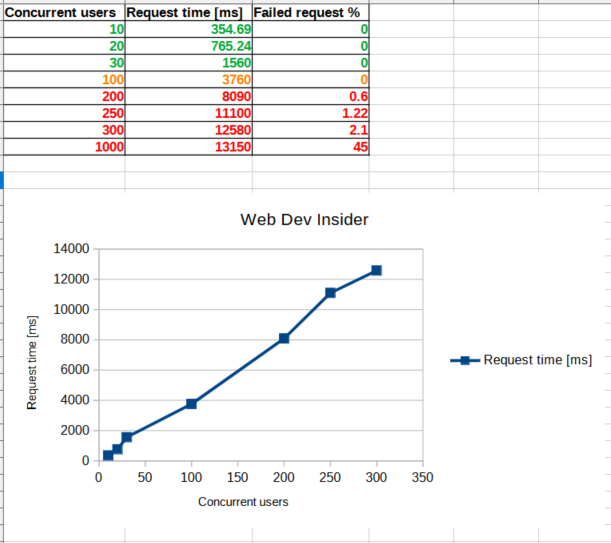
- Do a few tests increasing amount of concurrent clients. Note, that the more concurrent clients the more time average request takes due to decreasing server resources
- More concurrent clients slows time for request
- If failed requests start to appear – it’s a “bad” sign. It means server resources limit has been reached
- If average user opens a few tabs using website, provide -m option with average amount of opened tabs
- h2load does not generate any reports, so you will need to manually collect and analyze the results of your tests. Simply grab needed values to Excel table, analyze them and generate a chart. `Time for request` is the most valued result because it describes full time needed to make a request and get a full response (code and body)